
- If you've moved schools, follow the instructions here
- If you need to change the name or address of your school, please email support@sumdog.com
How to find your school settings
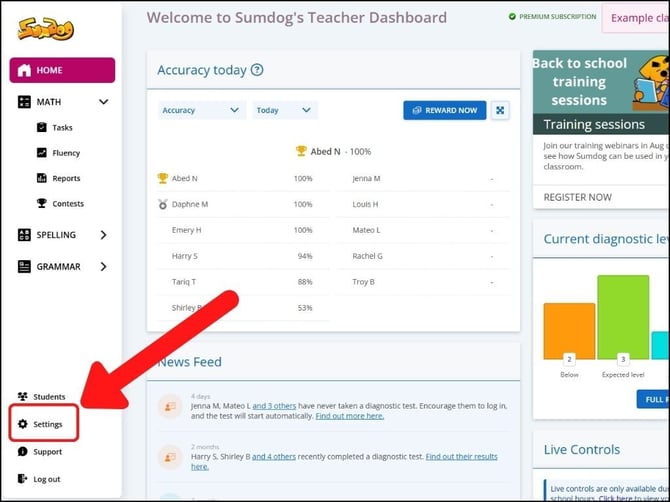
- Select "Settings" from the navigation bar on the left side of your dashboard
- Click "change" in the School Details box
.jpg?width=670&height=503&name=Support_Dashboard_SchoolDetails%20(2).jpg)
- Click 'change' in the row of the setting you want to change. To change the school address, contact our support team.
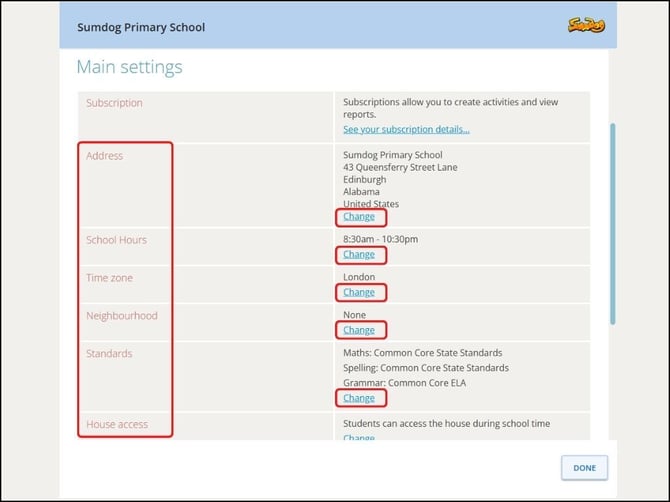
- Adjust the settings based on the options on the page and click "save"
- Click "done" to exit the settings
What school settings can I change?
There are nine options you can change for your school:
- Address - To change you school name or address, you'll need to contact our support team at support@sumdog.com
- School hours -- Adjust the start time and end time for a standard school day. By default this will be set as 8:30 a.m. to 4:30 p.m.
- Time zone -- Select the time zone your school is in from a dropdown menu
- Neighborhood -- This allows you to change your region as well as your district or local authority
- Standards -- Choose the educational standards/curriculum for your school
- House access -- By default the house will be closed during school hours, but here you can choose to have the house open at all times
- Gift settings -- Choose whether or not you would like to allow your students to send each other gifts for the house/garden
- Login type -- You can choose whether students log in with just their standard username and password, or if they log in with a shorter/edited username, password, and school code.